

 Tweet
Tweet
We just performed an essential upgrade to the site. Some things may be inoperational until later this evening, but the main forums are working perfectly.
On to the good stuff...the changes [Summary] ! What's new in this version.
This upgrade includes lots of new features, so look out for some useful ones like multi-quote & quick edit (Hey where's the loading page!?) and a real infraction/warning system (Unlucky you guys) and ect..
Multi-Quote
You now have the ability to quote multiple posts at once. On the far right side of each post where the normal "Quote" button is, you'll see a new button: Once you click it, you select that post for quoting. You can select as many posts as you wish this way. Then when you click the "Add Reply" button to go to the reply page, all of the selected posts will be there in the message area for you.
PM's now support BCC
You can now send PM's with CC's and/or BCC's.
Pause/Resume attachment downloading
You can now pause / resume attachment downloads. Though you might not find this useful all the time, users on dialup downloading large JPEG's will!
Block PM's from all but buddies
If you hate getting PM's from people you don't know, now you can block them all and only get them from people you add to your buddy list. (Note: staff are exempt from this block).
Instant Rep giving
Now when you click to give karma, a popup menu will appear. After you've submitted the request, everything is done instantly without any page loads.
Rate threads instantly
When you rate a thread via the drop down menu, it will be done instantly before your eyes without any page loads.
Attachments in threads available in popup on listing
You don't even have to go into a thread to view attachments anymore. Just click on the little paperclip icon and a popup will appear listing the attachments.
Instant Marking forums Read
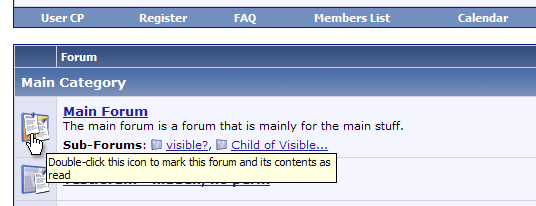
You can now quickly mark specific forums read by double clicking on their icon on the index page. This will instantly mark the forum read (also changing the icon to represent this) -- all without a single page reload.
If you wish to mark a forum read, you can simply click its status icon on the index page and the change will be processed without a reload. You can even mark individual sub-forums as read in the same way.
Quote tags link to post
When you quote a post, a link to that post will automatically be created. This is useful when you want to see an entire post or see the post in context.
Example:
New Buddy/Ignore List Editor Saves with AJAX
Along with a new interface, your buddy and ignore lists are saved with AJAX to prevent an unnecessary reload. Additionally to make the interface even easier to use, vBulletin searches for matching users as you type their names.
Block PM's from all but buddies
If you hate getting PM's from people you don't know, now you can block them all and only get them from people you add to your buddy list. (Note: staff are exempt from this block).
SkypeWeb integration into vBulletin.
SkypeWeb allows the online status of Skype users to be viewed on web pages, and fits very nicely with vBulletin.


Miscellaneous Updates
The above are only some of the features available. In addition, there is considerable update to many existing features which now will use AJAX technology, making life for you here at Superiormuscle.com much easier.
Also the vBulletin Message Editor have received some pretty big changes in how they work.
The new editor is in some ways far simpler than the old one, in that it uses exactly the same HTML for both WYSIWYG and Standard modes, and yet it harbours far more power.
Your window resize choices (using the and
and  controls) are now remembered, and WYSIWYG-compatible browsers can now switch live between WYSIWYG and Standard modes using AJAX, interpretting all formatting correctly while switching without refreshing the page.
Standard mode support is also improved by retaining selection choices after formatting. Previously if you selected a word and wrapped it in [b] tags, you would have had to select the word again before applying further formatting. With the new editor you can select the word and bash out [b] [i] [u] with the formatting buttons and never have to do any re-selecting of text.
Standard mode also now benefits from a new undo/redo system (for those who can't manage ctrl+z, ctrl+shift+z), and the ability to remove formatting in the same way as the WYSIWYG editor can by selecting some text and hitting the remove formatting button.
Also new for standard mode is the new list editor, designed to work as much like WYSIWYG mode as possible. In IE, Mozilla, Camino or Opera you can simply select paragraphs of text and hit one of the list buttons to generate a list.
Finally (for this announcement) vBulletin have implemented spell checking for Internet Explorer via ieSpell. Support for other browsers will be implemented as soon as tools with sufficient web-integration systems become available. (Nudge nudge to SpellBound developers).
If you have any comments or bug reports please report them
On to the good stuff...the changes [Summary] ! What's new in this version.
This upgrade includes lots of new features, so look out for some useful ones like multi-quote & quick edit (Hey where's the loading page!?) and a real infraction/warning system (Unlucky you guys) and ect..
Multi-Quote
You now have the ability to quote multiple posts at once. On the far right side of each post where the normal "Quote" button is, you'll see a new button:
Once you click it, you select that post for quoting. You can select as many posts as you wish this way. Then when you click the "Add Reply" button to go to the reply page, all of the selected posts will be there in the message area for you.PM's now support BCC
You can now send PM's with CC's and/or BCC's.
Pause/Resume attachment downloading
You can now pause / resume attachment downloads. Though you might not find this useful all the time, users on dialup downloading large JPEG's will!
Block PM's from all but buddies
If you hate getting PM's from people you don't know, now you can block them all and only get them from people you add to your buddy list. (Note: staff are exempt from this block).
Instant Rep giving
Now when you click to give karma, a popup menu will appear. After you've submitted the request, everything is done instantly without any page loads.
Rate threads instantly
When you rate a thread via the drop down menu, it will be done instantly before your eyes without any page loads.
Attachments in threads available in popup on listing
You don't even have to go into a thread to view attachments anymore. Just click on the little paperclip icon and a popup will appear listing the attachments.
Instant Marking forums Read
You can now quickly mark specific forums read by double clicking on their icon on the index page. This will instantly mark the forum read (also changing the icon to represent this) -- all without a single page reload.
If you wish to mark a forum read, you can simply click its status icon on the index page and the change will be processed without a reload. You can even mark individual sub-forums as read in the same way.
Quote tags link to post
When you quote a post, a link to that post will automatically be created. This is useful when you want to see an entire post or see the post in context.
Example:
Originally posted by THE BOUNCER
View Post
Along with a new interface, your buddy and ignore lists are saved with AJAX to prevent an unnecessary reload. Additionally to make the interface even easier to use, vBulletin searches for matching users as you type their names.
Block PM's from all but buddies
If you hate getting PM's from people you don't know, now you can block them all and only get them from people you add to your buddy list. (Note: staff are exempt from this block).
SkypeWeb integration into vBulletin.
SkypeWeb allows the online status of Skype users to be viewed on web pages, and fits very nicely with vBulletin.
Miscellaneous Updates
The above are only some of the features available. In addition, there is considerable update to many existing features which now will use AJAX technology, making life for you here at Superiormuscle.com much easier.
Also the vBulletin Message Editor have received some pretty big changes in how they work.
The new editor is in some ways far simpler than the old one, in that it uses exactly the same HTML for both WYSIWYG and Standard modes, and yet it harbours far more power.
Your window resize choices (using the
and controls) are now remembered, and WYSIWYG-compatible browsers can now switch live between WYSIWYG and Standard modes using AJAX, interpretting all formatting correctly while switching without refreshing the page.Standard mode support is also improved by retaining selection choices after formatting. Previously if you selected a word and wrapped it in [b] tags, you would have had to select the word again before applying further formatting. With the new editor you can select the word and bash out [b] [i] [u] with the formatting buttons and never have to do any re-selecting of text.
Standard mode also now benefits from a new undo/redo system (for those who can't manage ctrl+z, ctrl+shift+z), and the ability to remove formatting in the same way as the WYSIWYG editor can by selecting some text and hitting the remove formatting button.
Also new for standard mode is the new list editor, designed to work as much like WYSIWYG mode as possible. In IE, Mozilla, Camino or Opera you can simply select paragraphs of text and hit one of the list buttons to generate a list.
Finally (for this announcement) vBulletin have implemented spell checking for Internet Explorer via ieSpell. Support for other browsers will be implemented as soon as tools with sufficient web-integration systems become available. (Nudge nudge to SpellBound developers).
If you have any comments or bug reports please report them
Comment